August 5, 2026
The decoder lies: shipping halftone QR codes that actually scan
A production retrospective from sqr.art, a generator of
artistic QR codes whose engine, sqrart/qart,
is open source (MIT).
Our software oracle decoded every code we generated. Version, mask, error correction — all consistent, all readable. We shipped a run, printed one at 4 cm, pointed a phone at it, and it wouldn't scan.
That gap — between a decoder reads the file and a phone reads the print — is the whole story of putting halftone QR codes into production. The papers solve the encoding. Nobody warns you about the camera.
This isn't a tutorial on halftone QR. The technique goes back to a 2013 SIGGRAPH Asia paper and there are several open implementations. This is what we learned after the encoding worked.
What a halftone QR actually is
A normal "logo QR" pastes an image on top of a working code and leans on error correction to survive the damage. A halftone QR is the opposite: the picture is the code. Every module is nudged toward the target image's local brightness, and the ones that would break the code are pulled back into line by solving a linear system over GF(2) — Gaussian elimination over the two- element field, with the data and error-correction bits as free variables and the finder/timing/format bits fixed.
In our engine the pivots are ordered by visual importance: the modules that matter most to the picture get solved first, so the discrepancies land where they hurt the eye least. The URL is encoded into the codewords; the image lives in the freedom the error-correction leaves behind.
The consequence that matters here: there is no margin to spare. A logo QR has redundant error correction sitting idle. A halftone QR spends that redundancy on the picture. When the physical world eats a little contrast, a logo QR shrugs and a halftone QR dies.
The oracle is not a camera
Before we deliver a code, we decode it back and check the URL. Concretely:
$result = (new QRCode(new QROptions([
    'readerUseImagickIfAvailable' => false,
])))->readFromFile($png);

return $result->data === $expectedUrl;
That's chillerlan/php-qrcode reading a pristine PNG — the same library that
renders our reference, used here as an oracle. If it round-trips, the code is
mathematically correct.
A phone is a different machine entirely. It sees a printed rectangle through cheap optics, at an angle, under kitchen light, then runs adaptive thresholding to decide which cells are black. The software oracle and the phone fail on different things, and — this is the trap — the oracle is not strictly the harsher of the two. It rejects codes a phone would forgive, and it forgives codes a phone rejects. Passing the oracle tells you the math is right. It tells you nothing about the print.
We spent real time building a "harder" software bench — feeding the decoder synthetic blur and noise to simulate a camera. It never reproduced a single field failure. Synthetic blur is not optics; a Gaussian kernel is not a phone binarizing a low-contrast print. Every bug below was found on paper, with a phone, and could not be reproduced in software.
The failures, in the order we hit them
1. Diamond dots were half the ink we thought
We offer a "diamond" module style — each cell drawn as a rotated square. It looked great on screen and scanned badly on paper. The reason was geometry, not optics: a diamond inscribed in a cell covers half the cell's area. Every dark module was carrying half the ink of the square it replaced, so at print sizes the phone's threshold lost them.
The fix is one line — scale the diamond's half-diagonal by √2 so its area equals the square it stands in:
public function span(float $d): float
{
    return $this === self::Diamond ? $d * M_SQRT2 : $d;
}
Same visual style, twice the ink. It scanned.
2. Flat logos have nothing to grab onto
A photo scans more reliably than a flat logo — the opposite of what you'd guess. A photograph is full of local contrast, so even where a module is "wrong" for the code, there's texture around it for the phone to lock onto. A flat brand logo is a uniform field: a large area of identical modules with a few discordant ones carrying the code. Printed, that uniform field lands right on the phone's binarization threshold, and the sparse discordant modules have no surrounding contrast to anchor the adaptive thresholding. The scanner can't decide, so it gives up.
We now detect flat sources up front — an image is "flat" when two luminance levels dominate its histogram — and for those we force the strongest error correction (ECC-H) and a zero error budget: no module is allowed to drift for the sake of the picture, because on a flat field every sacrificed module is one the phone can't recover. It's a deliberate trade of a little fidelity for a code that survives a laser printer.
3. Short URLs hug the image too well
To pack more picture in, we support a "short" URL mode where the solution lives in the codeword padding rather than being re-derived by the oracle. It's more faithful — and that's exactly the problem. The padding conformed to the image so well that large plain regions ended up with no discordant modules at all. No discordant module means no anchor for adaptive thresholding, the same failure as the flat logo, arriving through a different door. A photo that scanned fine in "full" mode would not scan in "short" mode at the same size.
None of our image heuristics cleanly separated the good short codes from the bad ones. So we stopped trying to be clever and bought margin instead: ECC-H by default from version 15 up. The URL is a few percent of a v15's capacity; the spare correction is nearly free, and every field failure we'd seen was low-ECC. Buy the margin; don't out-think the camera.
4. The print floor
Under roughly 4 cm at 300 dpi, nothing dense survives. A v15 code has modules about 1.9× smaller than a v10, and below the floor those cells fall under what phone optics and binarization can resolve. There's no software fix; it's physics. The practical rule we ship with: keep dense codes big, and when the design demands small, drop the version.
An aside on "too slow"
For a long time we believed high versions were computationally out of reach — the GF(2) elimination looked like it blew up past v20. It didn't. Profiling showed the cost was a hidden decoder probe we were running, not the elimination itself. PHP's XOR over packed integers is already at C speed for this; the linear algebra was never the bottleneck. We even built a Rust FFI path for the elimination and found we barely needed it — byte-for-byte identical output, marginal wins. The lesson rhymes with the rest: measure the real thing before you optimize the imagined one.
The only test that counts
Everything above changed the same conviction: the authoritative test is a printed sheet and a real phone. We ship a calibration command that lays out an A4 sheet at 300 dpi with a dozen variants at fixed physical sizes — including deliberately fragile controls (a low-ECC v15) that are expected to fail, so the sheet bounds the safe region instead of just confirming the happy path. You print it, you scan every tile with a phone, you write down what flashed. The software oracle stays in the pipeline as a correctness gate, but it never gets a vote on scannability.
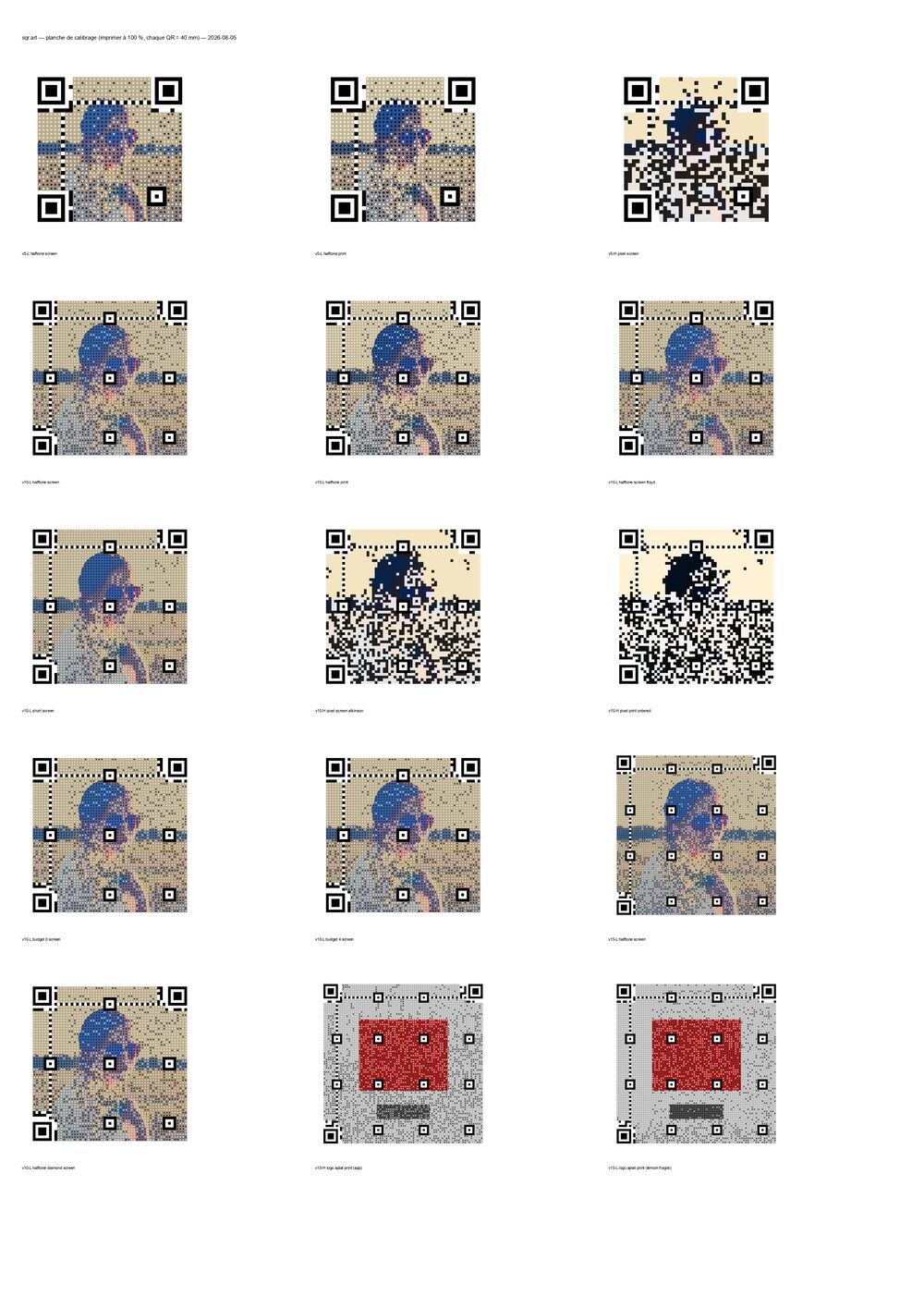
The sheet we actually print: every code at 40 mm, known-good variants next to controls built to fail, so a scan session bounds the safe region rather than confirming the happy path. Download the print-ready PDF (A4, 300 dpi) — print it at 100%, scan every tile with your phone, and write down what flashes.
Takeaways
- A halftone QR spends its error-correction budget on the image, so it has no margin left for the physical world. Treat it as fragile by default.
- A software decoder validates math, not print. It is neither strictly harder nor strictly softer than a phone camera — it fails differently. Synthetic blur won't close the gap.
- Contrast is what the camera grabs. Flat fields and over-faithful encodings starve it; buy margin with error correction rather than out-thinking the optics.
- Keep dense codes large. Below ~4 cm at 300 dpi, drop the version.
- Profile the real cost before optimizing the imagined one.
The engine is open source: sqrart/qart
on Packagist (source), MIT. The
hosted version, with the editor, print export and field-tested defaults, is at
sqr.art.